
Breaking News & Updates
Xero’s financial report reveals BIG loss but share price pop. - eepurl.com/isNmKQ
Excel Training Quick Tip
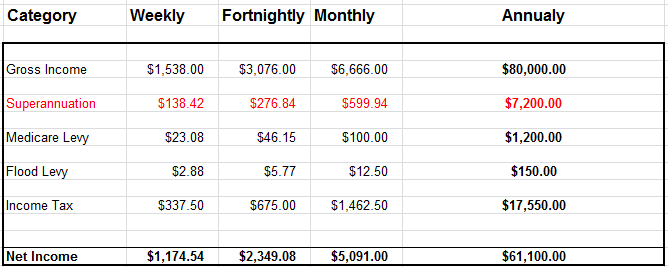
We recently created an Excel spreadsheet to demonstrate how to calculate the amount of PAYG, Super, Medicare levy and Flood Levy payable by a company for it’s employees based on an employees gross yearly income. It’s an excellent example of using IF STATEMENTS and NESTED IF STATEMENTS.
You can change the gross annual income and watch all the other figures change automatically.
We’ll be using this information in our MYOB Payroll Training Course which will undergo a huge update this quarter. If you are a small business owner you can calculate your PAYG obligations on a spreadsheet and then enter the pay transaction as a journal entry or spend money in your MYOB software.
This Payroll, PAYG, Super excel file is now freely available to students of the Microsoft Excel Online Training Course, just log into Course 306 which covers IF STATEMENTS. Remember if you are an MYOB training course student you can enrol into our Excel training course for a discount. See the Course Outline for MYOB Day-to-Day (existing students only) for the details of how to claim your discount.
-- Did you like what you read? Want to receive these posts via email when they are published? Subscribe below.









[…] student took a look at our newly created Staff Payment, PAYG, Super spreadsheet file and they wanted to know which formulas are used in the spreadsheet. This is a great question […]
[…] much money you owe to the employee, the ATO and the employees Superannuation company. We created a simple spreadsheet to calculate the amount of PAYG, Super, and other Levys that are owed when you pay a staff member. This spreadsheet is freely available to […]